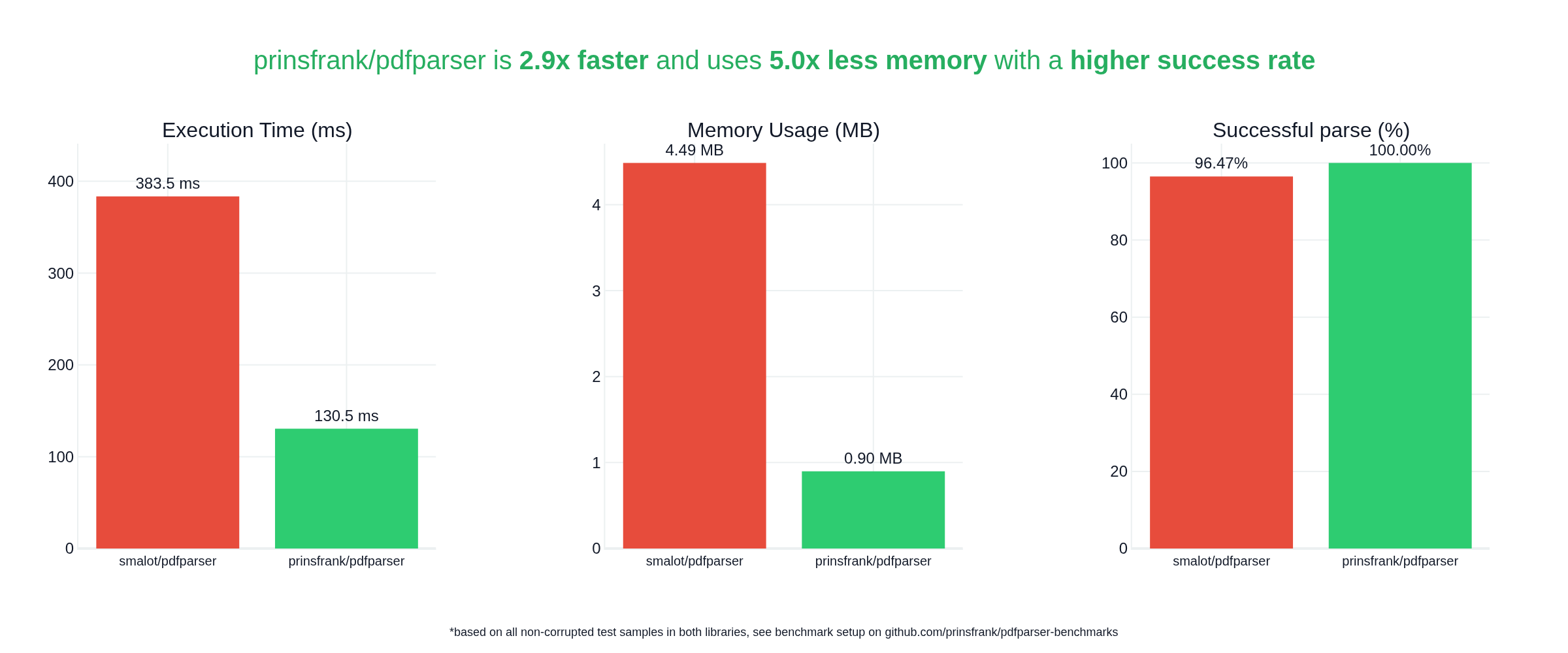
1<picture> 2 <source srcset="https://github.com/PrinsFrank/pdfparser/raw/main/docs/images/banner_dark.png" media="(prefers-color-scheme: dark)"> 3 <img src="https://github.com/PrinsFrank/pdfparser/raw/main/docs/images/banner_light.png" alt="Banner"> 4</picture> 5 6# PDF Parser 7 8[](https://github.com/PrinsFrank/pdfparser/blob/main/LICENSE) 9[](https://github.com/PrinsFrank/pdfparser/blob/main/composer.json) 10[](https://codecov.io/gh/PrinsFrank/pdfparser) 11[](https://github.com/PrinsFrank/pdfparser/blob/main/phpstan.neon) 12[](https://github.com/sponsors/PrinsFrank) 13 14Maintainable, fast & low-memory; built from scratch 15 16## Why this library? 17 18Previously, there wasn't a PDF library that allows parsing of PDFs that was open source, MIT licensed and under active development. The PDFParser by smalot, while having been very useful over the years isn't under active development anymore. The parser of Setasign is not MIT licensed and not open source. And several other packages rely on java/js/python dependencies being installed that are called by PHP behind the scenes, losing any type information and underlying structure. 19 20Instead, this package allows for parsing of a wide variety of PDF files while not relying on external dependencies, all while being MIT licensed! 21 22## Comparison with `smalot/pdfparser` 23 24<picture> 25 <source srcset="https://prinsfrank.github.io/pdfparser-benchmarks/comparison_dark.png" media="(prefers-color-scheme: dark)"> 26 <img src="https://prinsfrank.github.io/pdfparser-benchmarks/comparison_light.png" alt="Banner"> 27</picture> 28 29See the [benchmark repository](https://github.com/PrinsFrank/pdfparser-benchmarks) for more details. 30 31## Setup 32 33To start right away, run the following command in your composer project; 34 35```bash 36composer require prinsfrank/pdfparser 37``` 38 39<details> 40 <summary>Installation without Composer</summary> 41 <p>If you don't want to install this package using Composer, or cannot due to some constraints, you can still download the contents of the latest release and use this package directly.</p> 42 <p>As you don't have Composer to handle autoloading for you, you'll need to register the custom autoloader from this project. To do so, simply add the following line at the top of your custom bootstrap script or the file you want to parse PDFs in:</p> 43 <code>require 'path/to/package/directory/.al-custom.php';</code> 44 <p>This needs to point to the <code>.al-custom.php</code> file in the directory that the contents of this package is in.</p> 45</details> 46 47The most common use case - extracting text from a document - is then just as simple as this; 48 49```php 50use PrinsFrank\PdfParser\PdfParser; 51 52$document = (new PdfParser()) 53 ->parseFile($path); 54 55$document->getText(); 56``` 57 58## �� Sponsorship 59 60If you depend on this package and want to support its maintenance, please consider sponsoring me. I'll continue maintaining and releasing updates regardless, but [sponsorships](https://github.com/sponsors/PrinsFrank) help cover the time it takes to review changes and keep everything accurate. 61 62## Opening a PDF 63 64To open a PDF file, you'll first need to load it and retrieve a `Document` object. That can be done by either parsing a file directly, or parsing a PDF from a string variable. 65 66### Parsing a PDF file 67 68Parsing a PDF from a file directly is the easiest option. To do so, simply call the `parseFile` method on a `PdfParser` instance: 69 70```php 71use PrinsFrank\PdfParser; 72 73$document = (new PdfParser()) 74 ->parseFile(dirname(__DIR__, 3) . '/path/to/file.pdf'); 75``` 76 77By default, this loads the file into memory while parsing. This greatly improves parsing speed, at the cost of a bigger memory footprint. If you want to reduce the base memory footprint and use a file handle instead, you can set the second parameter `useInMemoryStream` to `false`. 78 79### Parsing PDF from string 80 81It is also possible to parse a PDF from a string in a variable. To do so, pass the string as an argument for the `parseFile` method on a `PdfParser` instance. 82 83```php 84use PrinsFrank\PdfParser; 85 86$pdfAsString = file_get_contents(dirname(__DIR__, 3) . '/path/to/file.pdf'); 87 88$document = (new PdfParser()) 89 ->parseString($pdfAsString); 90``` 91 92If you want to decrease the average memory footprint, you can also do so here, by setting the `useFileCache` parameter to `true`. This will result in the file content being written to a temporary file and the parser using the handle to that file from then on. This will be at the cost of speed. 93 94## The `Document` 95 96Once you have opened a file from the filesystem with `parseFile` or from a string variable using `parseString`, you'll get back an instance of a `Document`. 97 98While initially parsing the document, a small number of variables are populated in the `Document` instance that allow for further accessing of that document. This includes: 99- The public `$stream` property: a PHP stream handle to the file in memory or on the filesystem. 100- The public `$version` property: Information about the PDF version of the file. 101- the public `$crossReferenceSource` property: A parsed crossReference table or stream, containing several crossReference(Sub)Sections that contain information about objects stored in the document and where to find them. 102- The private `$pages` property to cache any pages that have already been retrieved. This property is only set when the pages are actually retrieved using the `getPages` method. (See below) 103 104The document also contains several methods to retrieve specific objects from it. Those are discussed below. 105 106If you want to quickly retrieve all text from a document, you can use the `getText` method. 107 108## Objects in a `Document` and their decorators 109 110A PDF is organized in objects. Not all objects are created equally. Some objects might be a Page, while others a Font. Some objects might be Generic and without a specific type. There are currently 18 specific types, and a generic object type. Some of those will be specified below. 111 112Code specific for certain object types lives in that object types' decorator. Retrieving text for a Page makes sense, retrieving the text from a Font not so much, so the Page decorator contains the `getText` method. Below you'll find some documentation for specific object decorators. 113 114If you want to retrieve an object by its number, you can call the `$document->getObject($objectNumber)` method. If you know that the object with that number is supposed to be of a specific type, you can supply the second argument. For example, if you want to get object 42 which you know is of type Page, you can call the method like this: 115 116```php 117$page = $document->getObject(42, Page::class); 118``` 119 120If the object is not of the correct type, this will result in an exception. If you don't care about the object type, pass null as the second argument or don't supply the second argument at all. 121 122### Decorated `InformationDictionary` objects 123 124If a PDF has a title, producer, author, creator, creationDate or modificationDate, it is stored in an InformationDictionary. 125 126If a PDF has an InformationDictionary, it can be retrieved using the `$document->getInformationDictionary()` method. Not All PDFs have this available, so this method might return null. 127 128To access information from the InformationDictionary, there are several methods available: 129 130```php 131/** @var \PrinsFrank\PdfParser\Document\Document $document */ 132$title = $document->getInformationDictionary()?->getTitle(); 133$producer = $document->getInformationDictionary()?->getProducer(); 134$author = $document->getInformationDictionary()?->getAuthor(); 135$creator = $document->getInformationDictionary()?->getCreator(); 136$creationDate = $document->getInformationDictionary()?->getCreationDate(); 137$modificationDate = $document->getInformationDictionary()?->getModificationDate(); 138``` 139 140If you want to access non-standard data from the information dictionary, you can also retrieve the entire dictionary from the object: 141 142```php 143/** @var \PrinsFrank\PdfParser\Document\Document $document */ 144$dictionary = $document->getInformationDictionary()?->getDictionary(); 145``` 146 147### Decorated `Page` objects 148 149Page objects can be retrieved from a document by calling the `$document->getPage($pageNumber)` method for a single page, or `$document->getPages()` for all pages. Note that `$pageNumber` is zero-indexed, so even if different format page numbers are displayed at the bottom of a page, the first page in a document is still page 0, etc. 150 151Once you have a `Page` object, there are several methods available to retrieve information from that page. The main method of interest here is the `$page->getText()` method. To retrieve all text from all pages, you could do something like this: 152 153```php 154use PrinsFrank\PdfParser\PdfParser; 155 156$document = (new PdfParser())->parseFile('/path/to/file.pdf'); 157 158foreach ($document->getPages() as $index => $page) { 159 echo 'Text on page ' . $index . ' : ' . $page->getText(); 160} 161``` 162 163There is also a `getText` method available on the Document to retrieve all text at once without even having to retrieve pages. 164 165There are also methods available to get the underlying positioned Text Elements using `$page->getPositionedTextElements()`, the resource dictionary for a page using `$page->getResourceDictionary()` and the font dictionary using `$page->getFontDictionary()`. 166 167### Decorated `XObject` objects 168 169Images and forms are stored in XObjects. These can be retrieved on a page-by-page basis using `$page->getXObjects()`. If you are only interested in images, you can retrieve all image XObjects by calling `$page->getImages()`. 170 171For XObjects, there are some additional methods: `getWidth` returns the width of the object in pixels if available, `getHeight()` the height in pixels, and `getLength()` the length in bytes. To determine the subtype, there are two methods available: `isImage()` and `isForm`. If the XObject is an image, `getImageType()` will return the image type. 172 173To extract all images on a page and store them on your machine, you could do something like this: 174 175```php 176/** @var \PrinsFrank\PdfParser\Document\Document $document */ 177foreach ($document->getImages() as $index => $image) { 178 if (($imageFileExtension = $image->getImageType()?->getFileExtension()) === null) { 179 continue; // You could still save the file with a default file extension like 'jpg', but it is not clear what kind of image this is. 180 } 181 182 file_put_contents(sprintf('%s/image_%d.%s', __DIR__, $index, $imageFileExtension), $image->getContent()); 183} 184``` 185


)
)